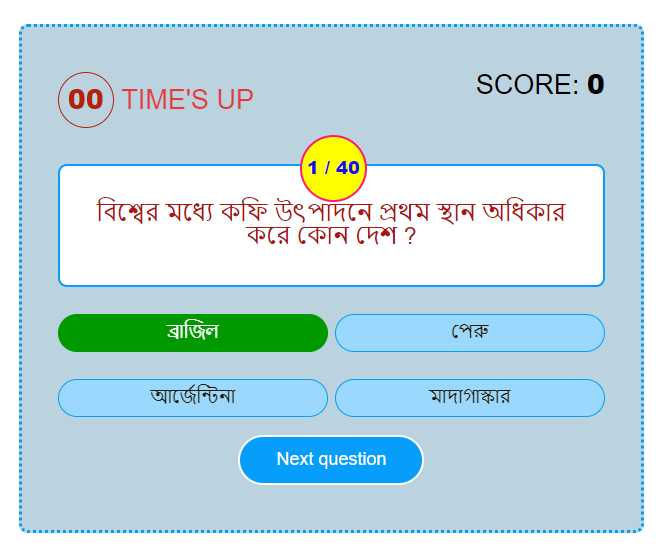
How to make this type Quiz & Answer
To make this type of Quiz & Answer need same html, CSS & Javascript. Now I share html ,CSS & Javascript
1.HTML For Quiz & Answer
<div class="quiz-home-box custom-box show">

    <p>

      </p><table id="simple_table">
        <tbody><tr>
          <th>বিষয়</th>
          <th>জিকে</th>
        </tr>
        <tr>
          <td>পর্ব</td>
          <td>৩৪৮</td>
        </tr>
        <tr>
          <td>প্রশ্ন সংখ্যা</td>
          <td>৪০টি</td>
        </tr>
        <tr>
          <td>পূর্ণমান</td>
          <td>৪০</td>
        </tr>
        <tr>
          <td>সময়</td>
          <td>৬০সে./প্রশ্ন</td>
        </tr>
      </tbody></table>

    <button class="start-quiz-qbtn qbtn" type="button">Start The Quiz</button>
  <p></p></div>
  <div class="quiz-box custom-box">
    <div class="stats">
      <div class="quiz-time">
        <div class="remaining-time"></div>
        <span class="time-up-text">Time's Up</span>
      </div>
      <div class="score-board">
        <span class="score-text">score:</span>
        <span class="correct-answer"></span>
      </div>
    </div>
    <div class="question-box">
      <div class="current-question-num"></div>
      <div class="question-text"></div>
    </div>
    <div class="option-box"></div>
    <div class="answer-description"></div>
    <div class="next-question">
      <button class="next-question-qbtn qbtn" type="button">Next question</button>
      <button class="see-result-qbtn qbtn" type="button">See Your Result</button>
    </div>
  </div>
  <div class="quiz-over-box custom-box">
    <h1>মকটেস্ট ফলাফল</h1>
    <p>
      মোট প্রশ্ন সংখ্যা:
      <span class="total-questions"></span>
    </p>
    <p>
      উত্তর দিয়েছেন: <span class="total-attempt"></span>
    </p>
    <p>সঠিক উত্তর: <span class="total-correct"></span></p>
    <p>ভুল উত্তর: <span class="total-wrong"></span></p>
    <p>Percentage: <span class="percentage"></span></p>
    <button class="start-again-quiz-qbtn qbtn" type="button">Start Again</button>
    <button class="go-home-qbtn qbtn" type="button">Go To Home</button>
    <button class="go-home-qbtn qbtn" type="button">
      <a href="https://telegram.me/swapnos" target="_blank" rel="noopener"><span style="color: white;">telegram</span></a>
    </button>
  </div>
2.CSS For Quiz & Answer
<style>
/*** Quiz CSS Start ***/
{
box-sizing: border-box;
}
.custom-box{
max-width: 800px;
background-color: #F7F7F7;
margin:30px auto;
padding: 50px 40px;
border-radius: 10px;
border-style: double;
border-color: #069DFB;
}
.quiz-home-box{
text-align:center;
display: none;
}
.quiz-home-box.show{
display: block;
animation: fadeInRight 1s ease;
}
.quiz-home-box p{
font-size: 30px;
font-weight: 500;
color:#059360;
margin: 0 0 30px;
border-style: solid;
}
.qbtn{
background-color: #004527;
border: 3px solid #FFFFFF;
padding: 14px 40px;
color: #ffffff;
font-size: 20px;
border-radius: 30px;
font-family: 'Montserrat', sans-serif;
cursor: pointer;
white-space: nowrap;
margin: 0 10px;
}
.qbtn:focus{
outline:none;
}
.quiz-box{
background-color: #bad3df;
display: none;
}
.quiz-box.show{
display: block;
animation: fadeInRight 1s ease;
}
.quiz-box .stats{
display: flex;
flex-wrap: wrap;
justify-content: space-between;
font-size: 30px;
text-transform: uppercase;
color: #000000;
}
.quiz-box .stats .quiz-time{
flex-basis: calc(50% - 20px);
max-width: calc(50% - 20px);
/*background: red;*/
text-align: left;
}
.quiz-box .stats .time-up-text{
/* display: inline-block;*/
color:#f40404;
font-weight: 500;
display: none;
}
.quiz-box .stats .time-up-text.show{
display:inline-block;
animation: fadeInOut 1s linear infinite;
}
@keyframes fadeInOut{
0%{
opacity: 0;
}
50%{
opacity: 2;
}
100%{
opacity: 0;
}
}
.quiz-box .stats .quiz-time .remaining-time{
height: 60px;
width: 60px;
color:#096b36;
border: 2px solid #096b36;
font-weight: 800;
line-height: 56px;
text-align: center;
border-radius: 50%;
display:inline-block;
}
.quiz-box .stats .quiz-time .remaining-time.less-time{
color:#b5200d;
border-color:#b5200d;
}
.quiz-box .stats .score-board{
flex-basis: calc(50% - 20px);
max-width: calc(50% - 20px);
/*background: blue;*/
text-align: right;
}
.quiz-box .stats .score-board .correct-answer{
font-weight: 800;
}
.quiz-box .question-box{
background-color: #ffffff;
padding: 40px 30px;
margin-top: 40px;
border-radius: 10px;
font-size: 28px;
border: 3px solid #069DFB;
text-align: center;
position: relative;
}
.quiz-box .question-box .current-question-num{
height: 70px;
width: 70px;
background-color: yellow;
border:3px solid #ff1a75;
font-size: 20px;
font-weight: 800;
color:#1411e3;
border-radius: 50%;
line-height: 68px;
text-align: center;
position: absolute;
top:-35px;
left:50%;
margin-left: -35px;
z-index:1;
}
.quiz-box .question-box .question-text{
font-size: 26px;
font-family: sans-serif;
color:#ac1313;
}
.quiz-box .option-box{
display: flex;
flex-wrap: wrap;
justify-content: space-between;
}
.quiz-box .option-box .option{
background-color: #edfbf5;
flex-basis: calc(50% - 20px);
max-width: calc(50% - 20px);
margin-top: 30px;
padding: 7px 7px;
text-align: center;
font-size: 20px;
text-transform: uppercase;
font-weight: 500;
color:#231803;
border:2px solid #069DFB;
border-radius: 30px;
cursor: pointer;
position: relative;
animation: zoomIn .3s linear forwards;
opacity: 0;
}
@keyframes zoomIn{
0%{
transform: scale(0.8);
}
100%{
transform: scale(1);
opacity:1;
}
}
.quiz-box .option-box .option.already-answered{
pointer-events: none;
}
.quiz-box .option-box .option.show-correct{
background-color: #009900;
border-color:#009900;
color: #ffffff;
transition: all .3s ease;
}
.quiz-box .option-box .option.correct{
background-color: #009900;
border-color:#009900;
color:#ffffff;
opacity:1;
animation: pulse 1s linear;
}
@keyframes pulse{
0%{
transform: scale(1);
}
50%{
transform: scale(1.1);
}
100%{
transform: scale(1);
}
}
.quiz-box .option-box .option.correct::before{
content: '';
position: absolute;
height: 30px;
width: 30px;
right: 15px;
top:7px;
background-image: url("img/correct.png");
background-size: 20px;
background-position: center;
background-repeat: no-repeat;
animation: fadeInRight .5s ease;
}
.quiz-box .option-box .option.wrong{
background-color: #FB0505;
border-color:#FB0505;
color: #ffffff;
opacity:1;
animation: shake 1s linear;
}
.quiz-box .option-box .option.wrong::before{
content: '';
position: absolute;
height: 30px;
width: 30px;
right: 15px;
top:7px;
background-image: url("img/wrong.png");
background-size: 20px;
background-position: center;
background-repeat: no-repeat;
animation: fadeInRight .5s ease;
}
@keyframes shake{
0%,30%,50%{
transform: translateX(10px);
}
20%,40%{
transform: translateX(-10px);
}
60%{
transform: translateX(-7px);
}
70%{
transform: translateX(7px);
}
80%{
transform: translateX(-4px);
}
90%{
transform: translateX(4px);
}
100%{
transform: translateX(0px);
}
@keyframes fadeInRight{
0%{
opacity:0;
transform: translateX(40px);
}
100%{
opacity: 1;
transform: translateX(0px);
}
}
}
.quiz-box .answer-description{
background-color: #ffffff;
border:2px solid #c2af91;
margin-top: 20px;
padding: 15px;
border-radius:10px;
color: #555555;
display: none;
}
.quiz-box .answer-description.show{
display: block;
animation: fadeInRight 1s ease;
}
.quiz-box .next-question{
margin-top: 20px;
text-align: center;
}
.see-result-qbtn,.next-question-qbtn{
display: none;
}
.see-result-qbtn.show,
.next-question-qbtn.show{
display: inline-block;
animation: fadeInRight 1s ease;
}
.quiz-over-box{
text-align: center;
display: none;
}
.quiz-over-box.show{
display: block;
animation: fadeInRight 1s ease;
}
.quiz-over-box h1{
font-size:50px;
font-family: 'Concert One', cursive;
color: #f85943;
margin:0px 3 20px;
}
.quiz-over-box p{
font-size:25px;
font-weight: normal;
color: #444444;
margin: 15px 0 20px;
}
.quiz-over-box p span{
font-weight: 800;
color:#111111;
}
.start-again-quiz-qbtn,
.go-home-qbtn{
margin-top: 15px;
}
/*responsive*/
@media (max-width: 767px){
.custom-box{
background-color: #cbe1e0;
}
.quiz-home-box p{
font-size: 16px;
}
.qbtn{
padding: 7px 20px;
font-size: 15px;
}
.quiz-box .question-box{
padding: 40px 0px;
}
.quiz-box .question-box .question-text{
font-size: 17px;
font-family: sans-serif;
color: #1d1b19;
}
.custom-box{
padding: 30px 10px 50px 10px;
background-color: #d5deee;
}
.quiz-box .stat{
font-size:20px;
}
.quiz-box .stats .quiz-time {
flex-basis: calc(60% - 10px);
max-width: calc(60% - 10px);
font-size: 18px;
}
.quiz-box .stats .score-board{
flex-basis: calc(40% - 10px);
max-width: calc(40% - 10px);
font-size: 16px;
}
.quiz-box .stats .quiz-time .remaining-time{
height: 50px;
width: 50px;
line-height: 46px;
color: #045e2e;
border: 2px solid #045e2e;
}
.quiz-box .question-box .current-question-num{
height: 60px;
width: 60px;
line-height: 58px;
top: -30px;
margin-left: -30px;
font-size: 16px;
}
.quiz-box .option-box .option{
flex-basis: 100%;
max-width: 100%;
font-size: 16px;
margin-top: 15px;
}
.quiz-over-box h1{
font-size: 30px;
}
.quiz-over-box p{
font-size: 20px;
margin: 10px 0 15px;
}
}
/* Quiz CSS End */
/* Quiz Table CSS Start */
#simple_table {
font-family: arial, sans-serif;
border-collapse: collapse;
width: 100%;
background-color: #ffffff;
color:black;
}
#simple_table td, #simple_table th {
text-align: center;
padding: 8px;
border: 1px solid #808080;
}
#simple_table tr:nth-child(even) {
background-color: #dddddd;
}#simple_table tr > th
{
background: #004527;
color: #ffffff;
}
/* Quiz Table CSS End */
</style>
3.Javascript For Quiz & Answer
<script>
const questionText=document.querySelector(".question-text");
    const optionBox=document.querySelector(".option-box");
    const currentQuestionNum=document.querySelector(".current-question-num");
    const answerDescription=document.querySelector(".answer-description");
    const nextQuestionBtn=document.querySelector(".next-question-qbtn");
    const correctAnswers=document.querySelector(".correct-answer");
    const seeResultBtn=document.querySelector(".see-result-qbtn");
    const remainingTime=document.querySelector(".remaining-time");
    const timeUpText=document.querySelector(".time-up-text");
    const quizHomeBox=document.querySelector(".quiz-home-box");
    const quizBox=document.querySelector(".quiz-box");
    const quizOverBox=document.querySelector(".quiz-over-box");
    const startAgainQuizBtn=document.querySelector(".start-again-quiz-qbtn");
    const goHomeBtn=document.querySelector(".go-home-qbtn");
    const startQuizBtn=document.querySelector(".start-quiz-qbtn");
    let attempt=0;
    let questionIndex=0;
    let score=0;
    let number=0;
    let myArray=[];
    let interval;


    function load(){
        number++;
       questionText.innerHTML=myApp[questionIndex].question;
        creatOptions();
        scoreBoard();
        currentQuestionNum.innerHTML=number + " / " +myApp.length;
    }
    function creatOptions(){
        optionBox.innerHTML="";
        let animationDelay=0.2;
        for(let i=0; i<myApp[questionIndex].options.length; i++){
            const option=document.createElement("div");
                  option.innerHTML=myApp[questionIndex].options[i];
                  option.classList.add("option");
                  option.id=i;
                  option.style.animationDelay=animationDelay + "s";
                  animationDelay=animationDelay+0.2;
                  option.setAttribute("onclick","check(this)");
                  optionBox.appendChild(option);

        }
    }

    function generateRandomQuestion(){
        const randomNumber=Math.floor(Math.random() * myApp.length);
       let hitDuplicate=0;
       if(myArray.length == 0){
            questionIndex=randomNumber;
        }
        else{
            for(let i=0; i<myArray.length; i++){
                if(randomNumber == myArray[i]){
                    //if duplicate found
                    hitDuplicate=1;

                }
            }
            if(hitDuplicate == 1){
                generateRandomQuestion();
                return;
            }
            else{
                questionIndex=randomNumber;
            }
        }

        myArray.push(randomNumber);
        console.log(myArray)
        load();
    }

    function check(ele){
        const id=ele.id;
        if(id==myApp[questionIndex].answer){
           ele.classList.add("correct");
            score++;
            scoreBoard();
        }
        else{
            ele.classList.add("wrong");
            //show correct option when clicked answer is wrong
            for(let i=0; i<optionBox.children.length; i++){
                if(optionBox.children[i].id==myApp[questionIndex].answer){
                    optionBox.children[i].classList.add("show-correct");
                }
            }
        }
        attempt++;
        disableOptions()
        showAnswerDescription();
        showNextQuestionBtn();
        stopTimer();

        if(number == myApp.length){
            quizOver();
        }
    }
    function timeIsUp(){
        showTimeUpText();
        //when time is up Show Correct Answer
        for(let i=0; i<optionBox.children.length; i++){
                if(optionBox.children[i].id==myApp[questionIndex].answer){
                    optionBox.children[i].classList.add("show-correct");

                }
            }
        disableOptions()
        showAnswerDescription();
        showNextQuestionBtn();
     if(number == myApp.length){
            quizOver();
          }
    }
    function startTimer(){
        let timeLimit=15;
        remainingTime.innerHTML=timeLimit;
        remainingTime.classList.remove("less-time");
        interval=setInterval(()=>{
          timeLimit--;
            if(timeLimit < 10){
                timeLimit="0"+timeLimit;

                }
                if(timeLimit < 6){
                    remainingTime.classList.add("less-time");
                }
                remainingTime.innerHTML=timeLimit;
                if(timeLimit == 0){
                clearInterval(interval);
                timeIsUp();
        }
        },1000)
    }
    function stopTimer(){
        clearInterval(interval);
    }
    function disableOptions(){
        for(let i=0; i<optionBox.children.length; i++){
            optionBox.children[i].classList.add("already-answered")
        }
    }
    function showAnswerDescription(){
        if(typeof myApp[questionIndex].description !== 'undefined'){
            answerDescription.classList.add("show");
            answerDescription.innerHTML=myApp[questionIndex].description;
        }

    }
    function hideAnswerDescription(){
        answerDescription.classList.remove("show");
        answerDescription.innerHTML="";
    }

    function showNextQuestionBtn(){
        nextQuestionBtn.classList.add("show");
    }
    function hideNextQuestionBtn(){
        nextQuestionBtn.classList.remove("show");
    }
    function showTimeUpText(){
        timeUpText.classList.add("show");
    }
    function hideTimeUpText(){
        timeUpText.classList.remove("show");

    }
    function scoreBoard(){
        correctAnswers.innerHTML=score;
    }

    nextQuestionBtn.addEventListener("click",nextQuestion);

    function nextQuestion(){
       generateRandomQuestion();
        hideNextQuestionBtn();
        hideAnswerDescription();
        hideTimeUpText();
        startTimer();
    }
    function quizResult(){
        document.querySelector(".total-questions").innerHTML=myApp.length;
        document.querySelector(".total-attempt").innerHTML=attempt;
        document.querySelector(".total-correct").innerHTML=score;
        document.querySelector(".total-wrong").innerHTML=attempt-score;
        const percentage=(score/myApp.length)*100;
        document.querySelector(".percentage").innerHTML=percentage.toFixed(2) +"%";
    }
    function resetQuiz(){
      attempt=0;
      //questionIndex=0;
      score=0;
      number=0;
      myArray=[];
    }

    function quizOver(){
        nextQuestionBtn.classList.remove("show");
        seeResultBtn.classList.add("show");
    }
    seeResultBtn.addEventListener("click", ()=>{
        quizBox.classList.remove("show");
        seeResultBtn.classList.remove("show");
        quizOverBox.classList.add("show");
        quizResult();
         })

    startAgainQuizBtn.addEventListener("click", ()=>{
        quizBox.classList.add("show");
        quizOverBox.classList.remove("show");
        resetQuiz();
        nextQuestion();
    })

    goHomeBtn.addEventListener("click", ()=>{
        quizOverBox.classList.remove("show");
        quizHomeBox.classList.add("show")
        resetQuiz();
    })

    startQuizBtn.addEventListener("click", ()=>{
        quizHomeBox.classList.remove("show");
        quizBox.classList.add("show");
        nextQuestion();
    })

    //window.onload=()=>{

    //}
</script>
4.Java For Only Quiz Option & Answer
<script>
myApp=[
//*****Questions Start*****//
{
question:' নিম্নের কোনটি পেনিসুলার নদী ? ',
options:['ব্রহ্মপুত্র','নর্মদা ','গঙ্গা','ইন্দাস'],
answer:1,
},
{
question:' মহাত্মা গান্ধী এবং বি আর আম্বেদকরের মধ্যে পুনা চুক্তি কত সালে স্বাক্ষরিত হয় ? ',
options:['1932','1929','1934','1936'],
answer:0,
},
{
question:' কৃষ্ণ যাদবকে কোন রাজ্য সরকারের পক্ষ থেকে বিক্রম আওয়ার্ড 2019 প্রদান করা হয় ? ',
options:['উত্তরপ্রদেশ','মধ্যপ্রদেশ','গুজরাট','মহারাষ্ট্র'],
answer:1,
},
]
//*****question end*****//
</script>Now Final Result Is Here
| বিষয় | জিকে |
|---|---|
| পর্ব | ৩৪৮ |
| প্রশ্ন সংখ্যা | ৪০টি |
| পূর্ণমান | ৪০ |
| সময় | ৬০সে./প্রশ্ন |
মকটেস্ট ফলাফল
মোট প্রশ্ন সংখ্যা:
উত্তর দিয়েছেন:
সঠিক উত্তর:
ভুল উত্তর:
Percentage:
Live Code In Codepens
How to make this type Quiz & Answer
- Efficiency: A quiz and answer script can automate the process of administering quizzes and evaluating answers, saving time and effort for both instructors and students.
- Standardization: Using a script ensures consistent quiz formats and grading criteria, reducing potential bias or subjective judgment in evaluating responses.
- Scalability: Quiz and answer scripts can handle a large number of participants simultaneously, making them suitable for online courses or situations where a high volume of quizzes needs to be administered.
- Immediate feedback: Scripts can provide instant feedback to participants, allowing them to review their performance and learn from their mistakes immediately after completing the quiz.
- Customization: Many quiz and answer scripts offer flexibility in creating different types of quizzes, including multiple-choice, fill-in-the-blank, and matching questions. This allows instructors to tailor quizzes to their specific learning objectives.
- Data collection and analysis: Script-based quizzes can collect data on participants’ performance, allowing instructors to analyze trends, identify areas of improvement, and make data-driven instructional decisions.
- Limited question types: While many quiz and answer scripts offer a variety of question formats, they may not support more complex or innovative question types that require manual grading or human judgment.
- Lack of personalization: Script-based quizzes often provide standardized feedback, which may not address individual learning needs or provide detailed explanations for incorrect answers.
- Cheating prevention: Although some scripts incorporate anti-cheating measures, it can still be challenging to ensure the authenticity of participants’ answers, especially in remote or unsupervised environments.
- Technical issues: Like any software, quiz and answer scripts can encounter technical glitches or compatibility problems, leading to delays or interruptions in the quiz-taking process.
- Learning limitations: Relying solely on script-based quizzes may not capture the full range of learning outcomes or skills that can be assessed through more interactive or hands-on assessment methods.
- Initial setup and learning curve: Implementing a quiz and answer script may require initial time and effort to set up the system, design the quizzes, and familiarize oneself with the software’s features and functionality.
What is a Quiz & Answer script?
A Quiz & Answer script is a software or script that allows users to create, manage, and administer quizzes or assessments with corresponding answers. It provides a platform for creating interactive quizzes, conducting assessments, and tracking results.
What are the key features of a Quiz & Answer script?
The features of a Quiz & Answer script may vary depending on the specific script or software, but some common features include
Is Script use in blogger?
Yes This Script use In blogger and any other HTML page or post
Is That Script Responsive
Yes This Fully 100% Responsive
How can a Quiz & Answer script be used?
A Quiz & Answer script can be used in various scenarios, such as:
- Education and e-learning: Creating interactive quizzes for online courses, educational websites, or distance learning platforms.
- Training and assessments: Conducting assessments, certifications, or skill evaluations in corporate training or employee development programs.
- Recruitment and hiring: Administering pre-employment assessments or screening tests during the hiring process.
- Online competitions: Organizing online quizzes or trivia contests for entertainment or promotional purposes.
- Surveys and feedback: Creating interactive surveys or feedback forms with multiple-choice questions.
Share This Quiz Script
One response to “Live Quiz Online”
-
Good

Good